
APPLY IN 3 EASY STEPS!
Step 1: Complete the OpenCCC Application

IMPORTANT: Select "STUDENT VISA (F-1)" when prompted, regardless of your current status.
Identify verification is required when submitting an application. Please use the ID.me option to verify your identity using your passport. If you select "verify later" you will need to be manually verified by Mt. SAC Admissions staff before your CCC Application can be received by the school. To be manually verified, submit your OpenCCC application first. Once you receive your Open CCC ID (different than the application confirmation number), email us at admissions@mtsac.edu with your full legal name to request a manual verification. State in your email that you are an international student and will need Zoom verification. Students currently in the U.S. may verify in person by visiting the Office of Admissions & Records during published business hours. You will need your Open CCC ID and a form of legal ID (driver's license, passport, etc) to complete the verification process.
Step 2: Claim Your Mt. SAC Student Account
Step 3: Complete the F-1 International Student Application
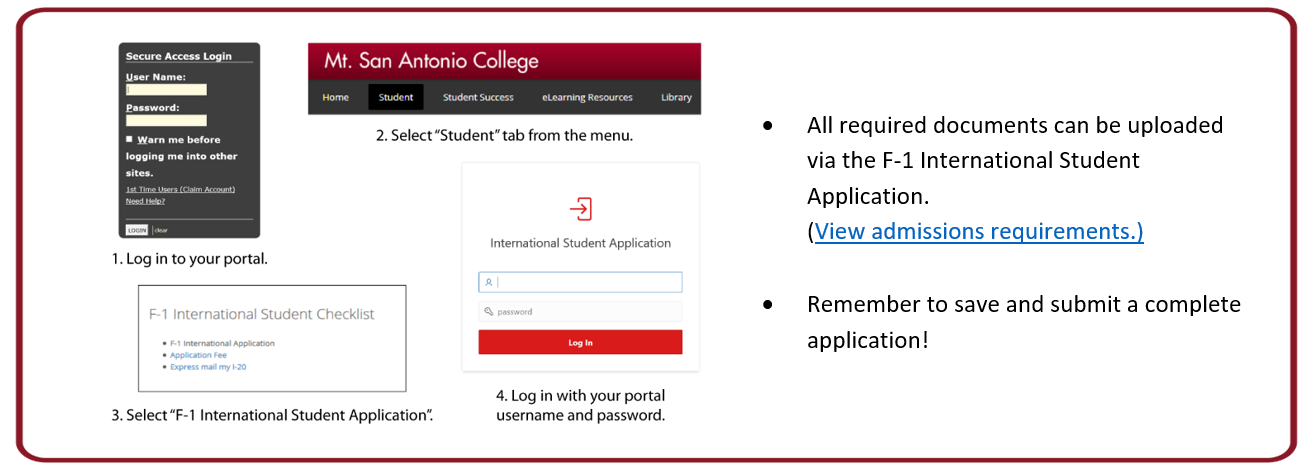
- Click on the “Sign In” link located on the red menu bar of the Mt. SAC homepage to access the Portal.
- Click the “Student” tab at on black menu bar in your portal (top, left corner).
- Find the “F-1 International Student Checklist” and click “F-1 International Application”.
- Enter your portal user name and password. Click “Log In” to continue.
- Follow directions to answer questions and upload documents. Remember to save any changes and submit when completed.
