High School Referral
Registration Guide
HSR Registration
Step 1: Complete the HSR Program Application (Required for All Students)
HSR Application (All Students)
- Please only do this form ONCE per session. If you need to make any changes, email us at hsr@mtsac.edu.
- Parent/guardian consent required
- Use a personal email (not a school email)
- Leave Mt. SAC ID# blank if you don't have one yet or don't remember it (we will look it up)
- Your counselor will review the request and you will be notified via email when they approve or modify it
Step 2: Complete the SCE Application (if you don't have a Mt. SAC ID#)
🚨 YOU ARE NOT ELIGIBLE TO BE ENROLLED UNTIL THIS STEP IS FULLY COMPLETED 🚨
Most students stop too early. You are ONLY finished when you SUBMIT YOUR PIN.
PART 1: CREATE YOUR ACCOUNT
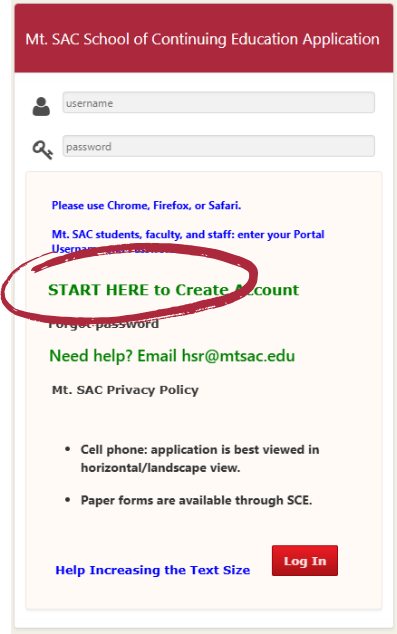
- Click “Start Here”
- Select New User Registration
- Use a personal email address (school, iCloud, and Outlook emails often do not work correctly)
- Enter your (the student's) information
PART 2: VERIFY YOUR EMAIL
👉 This is where most students stop by mistake.
- Check your email for a verification message "Mt. San Antonio College - SCE, Email Verification"
- Click the link in the email
⚠️ If you don’t see it:
- Check spam/junk folder
- Wait for an hour and try again
- Email us at hsr@mtsac.edu if you still don't get it
- Avoid iCloud or Outlook emails if possible (you can reapply with a different email, if needed)
PART 3: FINISH APPLICATION + SUBMIT PIN (THIS IS THE FINAL STEP)
Log back in after verifying your email
- Complete the High School Application
- Skip the Sexual Harassment Training for now
- You can leave the Social Security Number blank
- Save your information and make sure everything saved correctly (no errors showing)
- Select Request PIN one time only
- Clicking multiple times will create multiple PINs
- Check your email for the PIN
- Enter your PIN
- Click Submit
🚨 If you do not submit your PIN, you are NOT finished
⚠️ MOST COMMON MISTAKES
❌ Only creating an account (NOT DONE)
❌ Not logging back in after email verification
❌ Not requesting or entering the PIN
❌ Stopping before clicking Submit
❌ Using an email that doesn’t receive messages
✅ YOU ARE DONE IF:
- You submitted your PIN
- You do NOT receive messages saying your application is incomplete
👉 If you’re unsure, assume you are NOT finished and go back and check.
You will receive your Mt. SAC ID number after your counselor approves your courses.
NEED HELP?
If you get stuck at any point, contact us at hsr@mtsac.edu and we’ll help you finish quickly.
Check your email!
- Watch for a Smartsheet confirmation to the email you used on the HSR Application
- We will email you if anything is missing
- Most common missing item = SCE Application (Step #2 above)
- No confirmation email from us yet? Your counselor may still be reviewing your request
- Once your application is complete, we will register you - students do not register themselves
After You're Registered
- Academic Year (Fall-Spring) Students - Watch the orientation video before you start class so you know what to expect
- Summer Students - Required First-Day Orientation
- Attend a live First-Day orientation with your instructor (Zoom link in Canvas)
- Choose one session on the first day: 4pm, 5:30pm, or 7pm
- If you cannot attend on the first day, make-up orientations are available the first Tuesday & Wednesday at 7pm
- The Zoom link will be in Canvas after we register you
- An optional counselor-led orientation will also be offered in June
Upcoming Events
