Adult Basic Education

Adult High School Diploma & GED/HiSET Registration
Get registered in TWO steps!
(Adult Diploma students should also complete the Transcript Request Form)
Reminder: All programs are only available to students who reside in California.
1. Complete the AD & GED/HiSET Program Application
CLICK HERE FOR THE AD/GED APPLICATION
2. Complete the School of Continuing Ed (SCE) Application
CLICK HERE FOR THE SCE APPLICATION
Some students get stuck on this application - follow the steps below and you'll be able to complete it. If you need help, email omiri@mtsac.edu.
If you'd like one-on-one tech help, please visit "Zoom Tech Support Hours"
Quick summary
- Application website: mtsac.edu/noncreditapp
- Use a personal email address (School, iCloud, and Outlook emails often do not work correctly)
- Verification link expires in 5 days (email omiri@mtsac.edu if you don't get it)
- You are finished when you enter your PIN
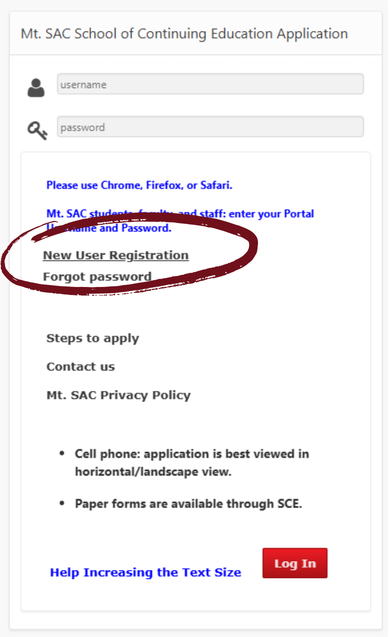
Step 1: Create your account
- Go to mtsac.edu/noncreditapp
- Select "New User Registration"
- Enter your information
- Submit the form to create your account
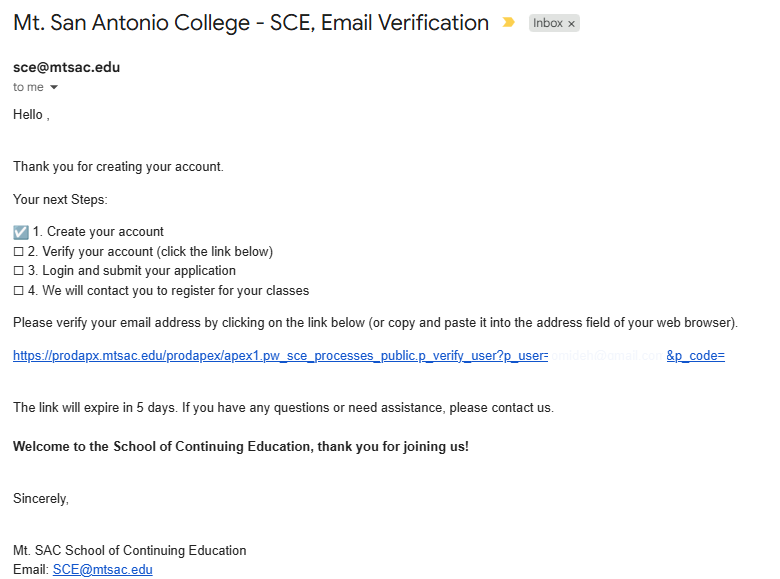
Step 2: Verify your email
- Check your email within about 5 minutes
- Click the verification link
- The link will only work for 5 days
If you do not receive the email:
- Check your spam or junk folder
- Make sure your email was entered correctly
- If needed, create a new account and start over
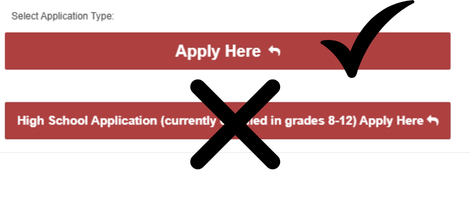
Step 3: Sign back in and open the application
- Return to mtsac.edu/noncreditapp
- Sign in using your email and password
- Scroll down and select "Apply Here" (near the bottom of the page)
Step 4: Complete the application
- Go to the tab on the top that says "User"
- Complete all required questions (You may skip the Social Security Number)
- Click on "Next"
- Complete info the "Ethnicity", "Education", and "Personal" tabs
- Under the "Programs" tab:
- Choose the "ABE" tab
- Select "Adult High School Diploma" and/or "High School Equivalency (GED/HiSET)"
- You can choose more programs, if you want!
- In the "Submission" tab, select your term and agree to the Agreement Statement
- Save your application
- Check for errors
- If an error appears, complete the missing information and save again
Step 5: Request your PIN
- Select Request PIN (only click once)
- Check your email for your PIN
Step 6: Submit your PIN
- Return to your application
- Enter your PIN
- Press Tab or Enter, then Submit
You are done with the SCE Application when you submit your PIN.
Once these two steps are done... check your email in a couple days!
- You will get an invitation to participate in orientation from an ABE counselor.
- The notice may go to your junk mail, so check that folder as well.
- GED students will be enrolled once orientation is completed.
- Adult Diploma students will be enrolled once orientation is complete and we have received your transcripts and created a "Student Educational Plan" outlining what is still needed to graduate.
ADULT DIPLOMA STUDENTS: Request Transcripts from Prior Schools
CLICK HERE FOR THE TRANSCRIPT REQUEST FORM
- We will use this information to request your transcripts from previous high schools or adult schools.
- We will let you know if you school charges fees for transcripts and/or if you need an official evaluation of international transcripts.
Additional Documents
- Mt. SAC AD Transcript Request Form (to request transcripts from the Mt. SAC AD Program)
- Work Experience Forms (check with your counselor if you have any questions)
Upload Additional Documents
Use this form to upload unofficial or digital transcripts, transcript request forms, work experience forms, etc.
